LINE
Connect your LINE Official Account through the Messaging API so your team can answer LINE messages from EngageOne.
On this page
A LINE inbox lets your team answer customers who message your LINE Official Account, right inside EngageOne.
How it works
- You connect a LINE Messaging API channel to EngageOne with its Channel ID, secret and access token.
- You paste EngageOne's webhook URL into the LINE Developers Console.
- When a customer messages your account, LINE sends the message to EngageOne. EngageOne checks the signature with your channel secret.
- EngageOne creates or updates the contact with the customer's LINE display name and picture, and opens a conversation.
- Agents reply in EngageOne, and the reply goes back through LINE.
Before you start
In the LINE Developers Console, open your Messaging API channel and copy:
- the Channel ID
- the Channel secret
- a long-lived Channel access token
Set up
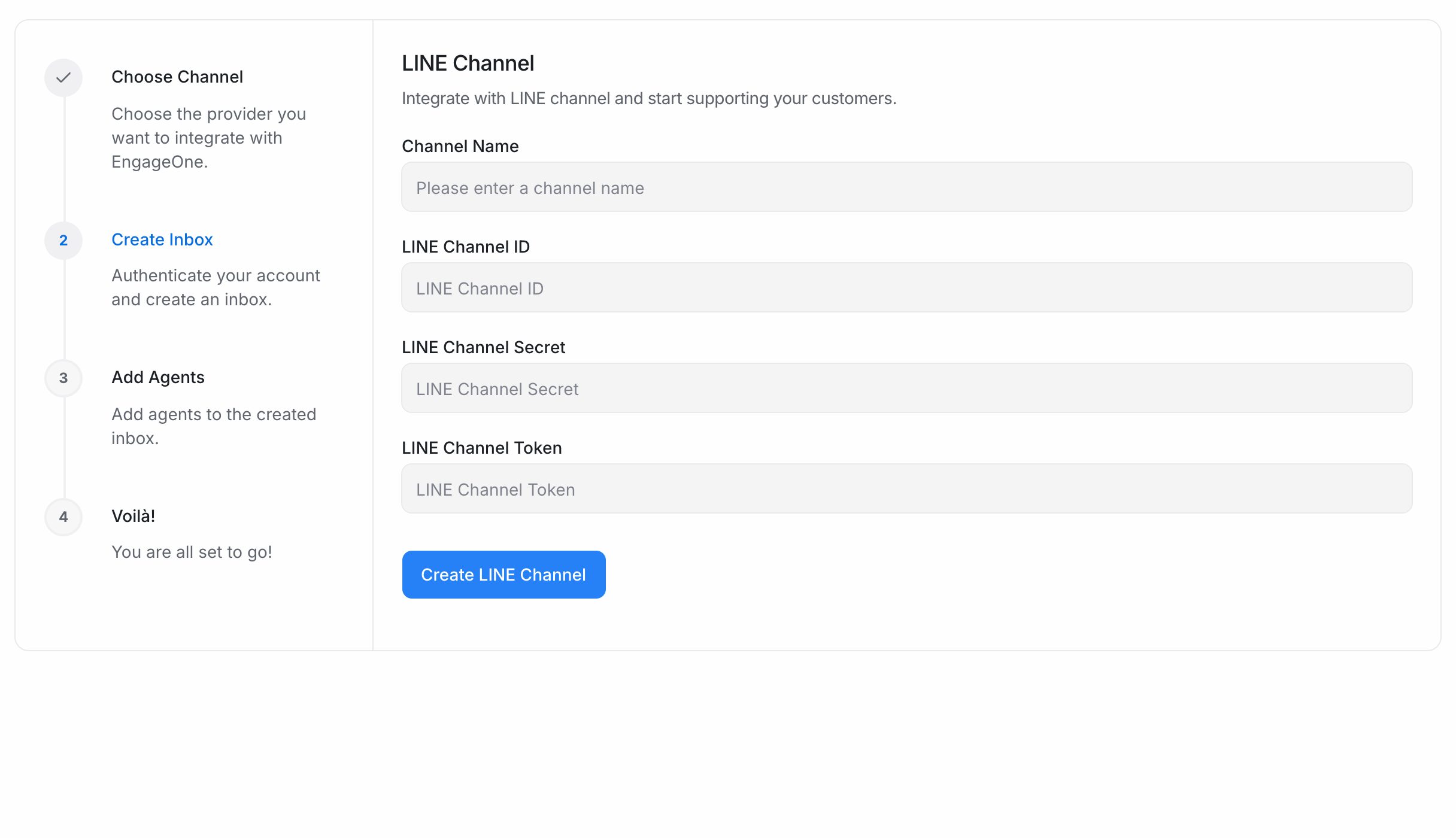
- In EngageOne, go to Settings → Inboxes → Add Inbox → Line.
- Enter a Channel Name.
- Enter the LINE Channel ID, LINE Channel Secret and LINE Channel Token.
- Select Create LINE Channel.
- Pick the agents for this inbox and select Add agents.
- Copy the webhook URL shown on the last screen. It looks like this:
https://<your-engageone-domain>/webhooks/line/<your LINE Channel ID>
- In the LINE Developers Console, paste it as the Webhook URL of your Messaging API channel and turn on Use webhook.
- Send a test message to your LINE account and check that it appears in the inbox.
Tip: You can find the webhook URL again in the inbox's Configuration tab.
What's supported
| Feature | Supported | Notes |
|---|---|---|
| Receive text, images, video, audio and files | Yes | |
| Receive stickers | Yes | Shown as an image |
| Send text | Yes | |
| Send images and video | Yes | |
| Send audio and other files | No | Share a link in a text message instead |
| Bot buttons | Yes | Sent as a LINE message with buttons |
| Contact name and picture | Yes | From the customer's LINE profile |
Good to know
- Each LINE Channel ID can be connected to only one inbox.
- If you change the channel secret in LINE, update it in EngageOne too. Otherwise incoming messages fail the signature check and are dropped.
- LINE's own plan and message quota rules apply to the messages you send.
Troubleshooting
| Problem | Likely cause | Fix |
|---|---|---|
| "We were not able to save the LINE channel" | A field is empty, or the Channel ID is already connected | Fill in every field and check your other inboxes |
| Messages never arrive | The webhook URL isn't set or Use webhook is off | Paste the URL from the Configuration tab and turn on Use webhook |
| Messages stopped after a secret change | The secret in EngageOne no longer matches LINE | Update the LINE Channel Secret in the inbox settings |
| Replies fail with a LINE error | The access token expired or LINE rejected the message | Issue a new channel access token and update it in the inbox |